

Engineering
Shrinking 4K frames for a detector: use the resize it was trained with
We fine-tuned the same detector twice, once with INTER_LINEAR and once with INTER_AREA, and ran each model both ways on 4K CCTV frames. The method matters less than matching it to training, and INTER_AREA on the CPU costs 23 ms a frame.
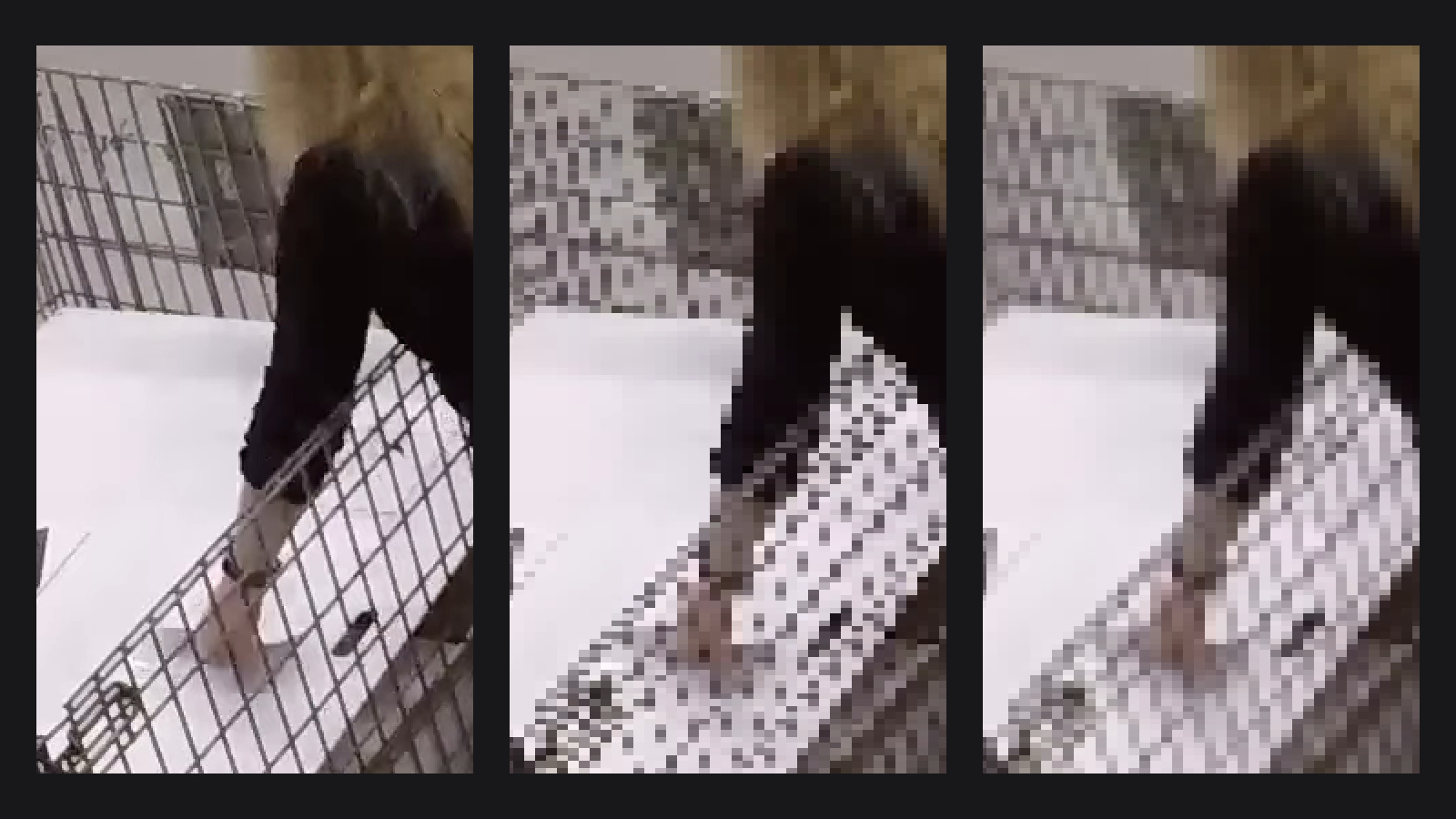
Every object detector starts with a step that is usually overlooked: shrinking the camera frame to the size the model wants. A lot of the cameras we use record in 4K (3840x2160), and most detectors use 640x640 by default. That is about 8.3 million pixels in and 0.4 million out, so roughly 19 of every 20 pixels are thrown away.
How they are thrown away is the interpolation method. OpenCV's default, and the default in D-FINE-seg, is INTER_LINEAR. Ask around and someone will tell you that INTER_AREA is "the right one for shrinking". So we measured it: does it find more people, and what does it cost?
TL;DR:
- Off-the-shelf COCO model:
INTER_AREAat inference gives +1.4 F1 points, and that is not noise.- Fine-tuned model: train and run with linear, or train and run with area. Both give the same score (0.870 vs 0.877, practically a tie). Swap the method after training and you lose about 1 point.
- Cost:
INTER_AREAin OpenCV takes 24 ms per 4K frame on one CPU thread, against 1 ms for linear. The whole frame-to-boxes time goes from 3 ms to 26 ms. On the GPU, an anti-aliased resize costs almost nothing.- For scale: fine-tuning on our own cameras gave +9 points. The resize gives 2 at most.
Linear vs area, in plain words
When you shrink a 4K frame to 640x640, every new pixel stands for a block of about 6x3 old pixels. There are three common ways to fill it in:
INTER_LINEARlooks at the 4 old pixels closest to the new one and blends them. The other ~16 pixels in the block are skipped.INTER_AREAaverages all the old pixels in the block, each with the same weight.- Bilinear with antialiasing also averages the whole block and a little around it, but gives the pixels near the centre more weight. PIL's bilinear resize works this way, and so does PyTorch's
F.interpolate(..., antialias=True). Many training pipelines resize with PIL, and so does the training code of the COCO weights we use.
Skipping pixels is fast, but it can go wrong. A thin line can land in the 4 pixels you sample, or between them, so it appears in one place and vanishes in the next. Fine textures can turn into patterns that were never there. This is called aliasing.
Antialiasing is the fix: blur the image a little before you shrink it, just enough that detail too fine for the new size averages out to a flat tone. Averaging all the pixels in the block does exactly that. You get a softer image, but a true one: fine detail fades out instead of turning into something else.
Here is what that looks like on a real camera. Below is a frame from a 4K fisheye camera in a warehouse, next to the 640x640 image a detector actually gets from it. The whole frame is squeezed into a square, so the boxed area becomes tall and thin. The close-ups show that area at full resolution and after each shrink, with one block per model pixel. With INTER_LINEAR, the wire mesh of the cage breaks up into scattered dots. With INTER_AREA and with bilinear plus antialiasing, it stays a regular grid of thin grey lines.
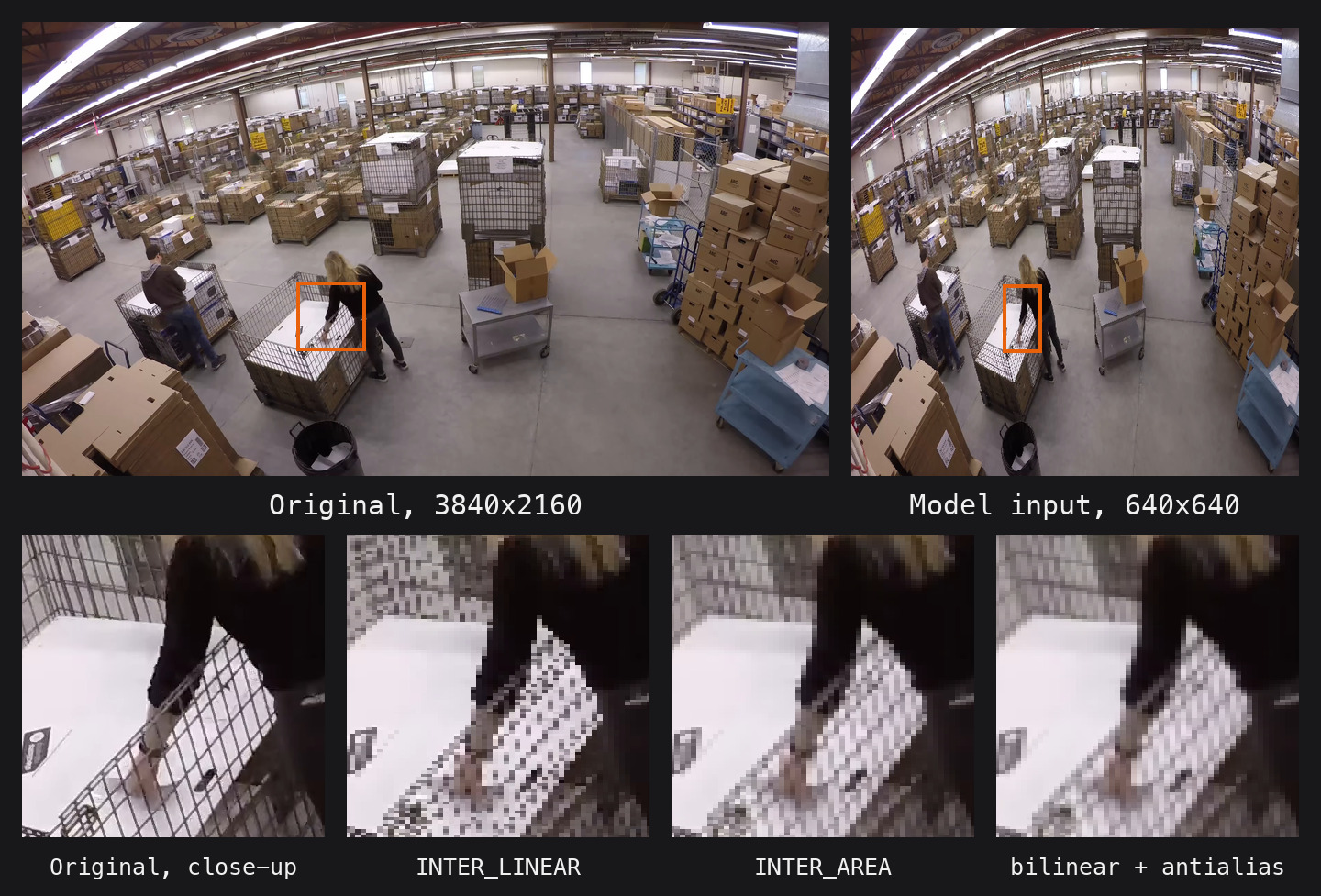
Frame from 2019 Warehouse Timelapse Video by Elections Alberta, licensed under CC BY 3.0. Resized and cropped.
The setup
- Data: 3,285 frames from 18 workshop CCTV cameras, with every person boxed by hand. 2,539 frames for training, 746 for validation from a different day. The validation set has 1,992 people: 446 frames are 4K (3840x2160) and 300 are 2304x1296.
- Box sizes: in the original frame people are big. The median box in validation is 584 px tall and 295 px wide. But on a 4K frame the squeeze to 640x640 is 6x across and only 3.4x down, so people get thin: the median box becomes 200 px tall and 60 px wide, and 1 person in 10 is less than 16 px wide (14% on 4K frames). Thin detail is where aliasing hurts.
- Model 1, off the shelf: D-FINE X trained on COCO, used as it is, person class only.
- Model 2, fine-tuned twice: D-FINE-seg S, 640x640, fine-tuned from COCO weights on our training frames. Both runs are identical except for one thing: the image resizes in training (including the mosaic augmentation) use
INTER_LINEARin the first run andINTER_AREAin the second. - Inference: each model runs with each resize. The full frame is stretched to 640x640.
- Accuracy: F1 at confidence 0.5 and IoU 0.5. F1 counts both missed people and false alarms; 1.0 is perfect. "One point" below means 0.01 F1.
- Is it real or noise? We re-drew the validation set 2,000 times (bootstrap) and checked how much the difference between two settings moves. If its 95% range includes zero, we call it a tie. Each setting was trained once, so the run-to-run noise of training is not in that range.
- Speed: TensorRT fp16 engine on an RTX 5090, batch 1, median time from a decoded frame to boxes.
Result 1: the off-the-shelf model likes area
F1 of the COCO model on the validation frames, all of them and per camera resolution:
| resize | all | 4K | 2304 |
|---|---|---|---|
INTER_LINEAR |
0.779 | 0.776 | 0.788 |
INTER_AREA |
0.793 | 0.791 | 0.798 |
| difference | +1.4 | +1.6 | +1.0 |
The 95% ranges of the differences are +0.5 to +2.2 for all frames and +0.5 to +2.6 for 4K frames, so the gain is real. On the 2304x1296 frames the range includes zero, so there it is a tie. The gain is biggest on 4K frames, where the shrink is the largest. Most of it comes from finding more people: recall on 4K frames goes from 0.73 to 0.75. With the resize on the GPU, area and bilinear with antialiasing both give 0.797.
The reason is simple: this model was trained on images resized with PIL, which is anti-aliased. INTER_AREA gives it images that look like the ones it learned from. INTER_LINEAR gives it more jagged images than it ever saw in training.
Result 2: the fine-tuned model likes what it was trained with
F1 of the fine-tuned S 640 models:
| trained linear | trained area | |
|---|---|---|
| run linear | 0.870 | 0.868 |
| run area | 0.863 | 0.877 |
The two bold cells are the "matched" ones, where training and inference use the same resize. Area/area is 0.7 points higher than linear/linear, but the range is -0.4 to +1.7, so it is a tie. The other two cells are the mismatched ones, and both lose points. A linear-trained model that runs with area loses 0.6 points with the CPU resize, and 1.0 point with the GPU resize (1.5 on 4K frames). The GPU numbers are clearly outside the noise.
Put the two results together and you get one rule: a model learns the look of its training images, including how they were resized. Fine-tuning makes it adapt to whichever resize you pick. After that, changing the resize costs accuracy. The COCO model is the same story: area is simply closer to the resize it was trained with.
For scale: the fine-tuned S model (linear/linear) beats the off-the-shelf X model by 9 points (0.870 vs 0.779), with a model that is much smaller. The resize is a 1-2 point lever. Training on your own cameras is the big one.
Result 3: what it costs
Median time per 4K frame, D-FINE-seg S, TensorRT fp16 on an RTX 5090. The CPU resize is OpenCV on 1 thread, the GPU resize is PyTorch. "Total" is the time from a decoded frame to boxes:
| method | resize | total |
|---|---|---|
CPU INTER_LINEAR |
1.1 ms | 3.0 ms |
CPU INTER_AREA |
24.2 ms | 26.1 ms |
| GPU bilinear | 0.20 ms | 1.7 ms |
| GPU area | 0.94 ms | 2.3 ms |
| GPU bilinear + antialias | 0.31 ms | 1.7 ms |
On the CPU, INTER_AREA takes longer than everything else in the chain added together: the resize alone is 8 times the whole linear pipeline. On 2304x1296 frames it is 12 ms (14.1 ms total). For the bigger X model the numbers are 4.4 ms and 27.6 ms. Part of the reason is that OpenCV has a fast area path only when both shrink factors are whole numbers, and 2160 to 640 is 3.375. More threads would make it faster, if the CPU has cores to spare.
On the GPU the picture changes. The GPU rows assume the frame is already in GPU memory, for example decoded there with NVDEC; we did not time the upload. Area adds 0.6 ms. Bilinear with antialiasing adds 0.1 ms to the resize and nothing you can see end to end, and it gives the same accuracy as area: 0.877 for the area-trained model and 0.797 for the COCO model.
What we take from it
- Use the resize your model was trained with. Check the training code: PIL and
torchvisionresizes are anti-aliased; OpenCV and Albumentations default toINTER_LINEAR. - Running someone else's pretrained weights? If they were trained with an anti-aliased resize, use one at inference too, and do it on the GPU with
F.interpolate(..., antialias=True). That was +1.4-1.7 points for about 0.1 ms. - For fine-tunes, linear vs area does not change accuracy. It is not worth 23 ms per frame on the CPU. We keep
INTER_LINEARfor our fine-tuned models. - Fine-tune before you tune the preprocessing. It was worth about 5 times more than the best resize.
FAQ
Is INTER_AREA better than INTER_LINEAR for object detection?
Only when it matches how the model was trained. A COCO model trained with anti-aliased PIL resizes gained 1.4 F1 points with INTER_AREA. Fine-tuned models scored the same with either method, as long as training and inference used the same one; mixing them cost about 1 point.
Why is OpenCV INTER_AREA so slow on 4K frames?
It reads every source pixel, and OpenCV has a fast path only for whole-number shrink factors. 3840x2160 to 640x640 is 6 by 3.375, so it takes the general path: 24 ms on one CPU thread against 1.1 ms for INTER_LINEAR.
How do I resize with antialiasing on the GPU?
Put the frame on the GPU as a float tensor and call torch.nn.functional.interpolate(x, size=(640, 640), mode="bilinear", antialias=True). On an RTX 5090 that took 0.31 ms for a 4K frame and gave the same accuracy as area.